Category: Tips Advice

  • How to Apply for Transfer of Interest in Land on Ardhisasa

    How to Apply for Transfer of Interest in Land on Ardhisasa

    What is the Transfer of Interest in Land?

    The transfer of interest in land refers to the passing of land ownership from one party to another. This process is applicable for sole proprietors, joint tenancy, or tenancy in common. It requires the involvement of a practicing advocate and registration of all parties involved on the platform.

    Read :How to create and individual account on ardhisasa

    To begin the process, the proprietor must have their property listed under the “My Property” section on the platform. The advocate initiating the transfer must have a current practicing certificate and an upgraded account from a public user to an advocate. Transfer of interest in land is under the land registration services.

    1.      Click on Quick links or view more options.

    2.      Click on transfer services, then transfer of interest in land. The application is based on Form 33 of the Land Registration Act 2012. The applications are categorized as;

    a)      pending- these are applications that require action or the action of the parties included in the transaction. The actions may range from and not limited to otp verification, execution, surrender of the title document, or payment of pending invoices.

    b)      Ongoing- these are applications that you are involved in but do not require your action this allows you to keep track of the progress of your application.

    c)      Completed- these are applications that have been worked on by the ministry and have been approved.

    d)      Rejected- these are applications that have been worked on by the ministry but have been rejected for one reason or another.

    e)      cancelled- these are applications that have either been cancelled by the parties involved or the registrar.

    3.      To start a new application, click on the “New Application” button. Before proceeding, read through the frequently asked questions for guidance on the process requirements.

    4.      Enter the necessary information provided by the client, including the parcel number listed on the title document. If the transferor is an individual or a company, search for their details using their additional ID. Verify the information provided.

    5.      Select the transferee and the holding type, which can be sole ownership, joint proprietorship, or tenancy in common. Provide the transferee’s details using their ID. Ensure all co-owners are included for tenancy in common to avoid rejection.

    6.      Specify the nature of interest to be transferred, such as leasehold or freehold. Enter the consideration amount (selling price) and add a pickup person who will collect the title document upon completion.

    7.      Enter the details of the attorney representing the transferor and transferee, including their ID and additional ID. For tenancy in common, define the shares of each buyer to ensure the total adds up to 100%.

    8.      In this section, the nature of interest to be transferred, such as leasehold or freehold, is specified. The consideration amount, which is the agreed selling price, is entered. A pickup person, registered on the platform, is assigned to collect the title document upon completion.

    9.      The advocate provides the details of their law firm, including the name, contact information, address, and website if applicable. If there are any additional provisions to be included in the transfer, they can be added in this section.

    10.  The applicant selects the land status (developed or undeveloped) and the category of valuer required for property valuation purposes. The option to apply for an exemption from stamp duty is also available, with additional information required if selecting “Other Section” or “Legal Notice.”

    11.  Upload relevant documents, such as the application for adjudication of stamp duty, and any additional agreements.

    12.  Before submitting the application, all entered information should be reviewed for accuracy. Upon submission, the advocate must append their signature using one of the provided signing options.

    13.  Both the transferor and transferee receive notifications and must verify the application using OTP codes sent to them. They have the option to change or add an advocate to represent them. Each party appends their signature to confirm their involvement.

    14.  Upon submission, the advocate must upload a scanned copy of the client’s title document and schedule a date to submit the original physical copy to the Ministry of Lands. A gate pass is issued for access to the premises.

    15.  The application proceeds for stamp duty determination, and once the amount is derived, the applicant is notified to make the payment. Failure to pay on time results in monthly penalties.

    Upon payment and submission, the application undergoes further processing. Applicants can track the progress on the application details page. Successful approval results in an invitation for the pickup person to collect the title document, while rejections are accompanied by reasons for the decision.

    For enquiries, please visit Ardhi House, Off Ngong Rd: P.O. Box 30450-00100, Nairobi, Kenya or email: [email protected]. The ministry can also be reached on phone:0746 962239.
  • How to Add Property on Ardhisasa

    How to Add Property on Ardhisasa

    To add property on Ardhisasa platform you need to have registered on the platform. If have not registered create an account here .Upon registration on the platform all your properties should not automatically appear under your account until you do this process. Login with your ID and password. You will be directed to your dashboard.

    Read: How to create an individual Account on Ardhisasa

    1.      Click on my properties button on the left side panel immediately the system navigates you to the properties list view if you do not have any existing property a pop-up will appear requesting you to add your property. If you have an existing property the pop-up will not appear you will be required to click on add property button on the top right corner. Another user for instance an advocate can add a property on your behalf every proprietor or administrator must be registered on the platform.

    2.      To add the property on their behalf once you click on add property you will be navigated to the add property form enter your parcel number or title number select the holding type which could be one sold proprietor if you are the only owner on that parcel, joint proprietorship this is where a person is owned by several individuals without any specification of what proportion they own proprietorship in common this is where the puzzle is owned by two or more individuals with distinct proportions.

    3.      Select the category appropriate which is either an individual or company.

    4.      Add the proprietor using their ID number or registration number in case it’s a company. If you are making this application on behalf of the proprietor you will enter their id number or registration number. If the proprietor is a trustee provide the names of the beneficiaries if you are an administrator, provide the name of the deceased.

    5.      Click on next button. It navigates you to the property details page.

    6.      Select the property type which is either leasehold parcel, freehold parcel, sub lease which is a long-term lease or sectional property.

    7.      Provide any land receipt if any on the sale property.

    8.      Enter the details of the receipt and upload the same by clicking on the choose file button.

    9.      Click on add receipt the system will accept a maximum of 5 most recent receipts then upload a scanned copy of your original certificate of title or lease.

    10.  Add any additional documents that will support your claim. This is done by entering the name of the document to be uploaded in order to activate the choose file button. This is not a mandatory field if you do not have any additional documents

    11.  Click on next. This page displays a summary of the information you provided in order to confirm the details.

    12.  Click on submit if all the information is accurate. The system will thereafter prompt you to confirm your submission.

    Upon confirmation, it notifies you as the owner or proprietor to wait for verification from the ministry so as to start transacting with the confirmed parcel. This is a rigorous verification process conducted by the ministry to ensure that the ownership documents and information provided tallies with the information held by the ministry. You will get notified after the verification process whether your application has been accepted, rejected or returned. When verification is successful you can now transact with it in the system.

    For enquiries, please visit Ardhi House, Off Ngong Rd: P.O. Box 30450-00100, Nairobi,Kenya or email: [email protected]. The ministry can also be reached on phone: 0746 962239.

    To read more articles like this, visit our website https://property254.co.ke/.You can reach us through  0726982982 or email us [email protected].

  • How to Conduct Land Search on Ardhisasa

    How to Conduct Land Search on Ardhisasa

    Land search is an application made to find out the ownership details of a property and other interests that have been registered on particular property. Conducting land search on Ardhisasa absolutely free. You need to be registered on the platform to access the land search.

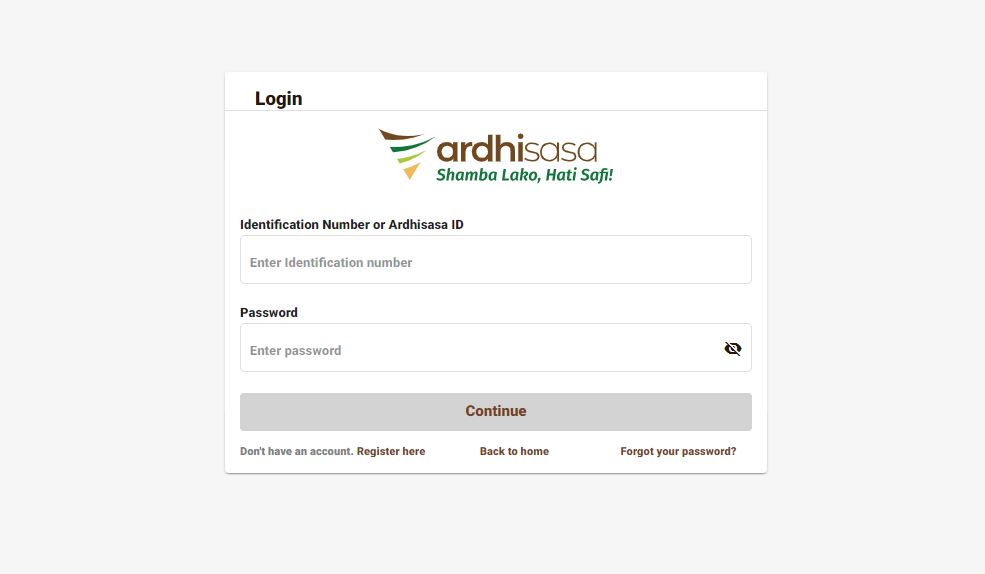
    1.      Log in to the Ardhisasa platform https://ardhisasa.lands.go.ke/account/login or first create an account if you don’t have one.

    2.      On the left-hand side click on services. You can access it on the quick links or select the view more option.

    3.      Click on the new application button on the top right corner.

    4.      Select the type of search to conduct.

    5.      Click add parcel number. The system allows maximum of 50 entries ensure the parcel number entered matches that which is on the printed title.

    6.      Enter the purpose of the search.

    7.      Select scope of search which is either particulars of the subsisting entries in the register or particulars noted on the property section / proprietorship section / power of attorney register / registered documents register. Click next to proceed.

    8.      Confirm the application details and submit.

    Upon submission, the system sends a notification to the current owner(s) of the property, already registered and verified their property with the Ministry of Lands and Physical Planning. The owner(s) need to log in to the platform, navigate to the search list view, and consent to the search request using a one-time password sent to their mobile phone.

    Read: How to Add Property on Ardhisasa

    Once the owner(s) verify the search, the results become available to the person who initiated the search. The search certificates can be downloaded, and a notification is sent to the initiator’s mobile phone. A search result of a non-existent parcel is considered valid.

    Click here to find properties for sale

    Click here to get a bank mortgage

    Reasons why search results may be unavailable

    ·         If the landowner hasn’t registered on the search platform

    ·         If the add property process hasn’t been initiated or approved by the Ministry of Lands and Physical Planning.

    ·         Wrong parcel number.

    For enquiries,  visit Ardhi House, Off Ngong Rd: P.O. Box 30450-00100, Nairobi,Kenya or email: [email protected]. The ministry can also be reached on phone: 0746 962239.

    Read more articles like this on our website  https://www.property254.co.ke/

  • How to Pay Land Rent on Ardhisasa

    How to Pay Land Rent on Ardhisasa

    Land rent is an annual fee charged by the government to proprietors who own leasehold properties. Failure to pay on time incurs a monthly penalty. This article will guide you on how to pay land rent obtain a land rent clearance certificate.

    To pay land rent online, you need to have a registered account on the platform.

    Read: How to register an account on Ardisasa

    1.      Log in to your account.

    2.      Go to services on the website.

    3.      Within the land administration services, select the Land Rent option. You will find two buttons: Get Clearance Certificate and Pay Land Rent.

    4.       Click on the Pay Land Rent.

    5.      You will be directed to a search page where you need to enter the title number of your parcel. This will allow you to find out the amount owed to the government as land rent. Note that leasehold titles do not require conversion for land rent payment.

    6.      Upon searching for your parcel, you may receive various responses:

    a)      No pending land rent: If there are no pending land rent payments, you will be informed accordingly.

    b)      Rent request cannot be processed: If the system is unable to process your rent request, contact the ministry’s customer service centre for assistance.

    c)      Pending land rent list: If there are pending land rent payments, a list of all the rent owed since the last payment will be displayed.

    d)       Issue with a paid invoice: If a paid invoice still shows as pending, contact the customer service center to address the matter.

    Quick read: How to Add Property on Ardhisasa

    7.      Click on the View Invoice option to see the details of each invoice, including any penalties.

    8.      To pay a pending invoice, click on the Pay button. The system offers payment options, such as M-Pesa or Cooperative Bank.

    9.      Follow the instructions provided to make the payment. Click Confirm to verify the payment.

    10.  After clearing all pending invoices, you can download your land rent clearance certificate for the current year.

    11.Go to the land administration services and click on Get Clearance.Enter the parcel details and click Get to download the clearance certificate.

    NOTE: If you have several pending land rent payments, you will be required to pay each one of them separately, since each has a unique invoice number. You will ONLY receive a Clearance Certificate once you have settled all pending payments.

    For enquiries, please visit Ardhi House, Off Ngong Rd: P.O. Box 30450-00100, Nairobi,Kenya or email: [email protected]. The ministry can also be reached on phone: 0746 962 239.

    Read more articles like this website https://property254.co.ke/ .You can reach us through 0726982982 or on email [email protected].

  • How to Make Subdivision Application on Ardhisasa

    How to Make Subdivision Application on Ardhisasa

    The subdivision application is initiated by a licensed surveyor who must be registered on the platform.

    1.      Visit https://ardhisasa.lands.go.ke.  

    2.      Log in to the Ardhisasa platform using your user credentials (identification number or additional ID and password).

    3.      Enter your OTP (one-time password) received on your registered phone number to complete the login process.

    4.      Once logged in, switch to your license surveyor account by clicking on the profile icon and selecting the professional account approved for you.

    Read: How to upgrade your account on Ardhisasa.

    5.      On the dashboard, you will find several departments listed under the Ministry of Lands and Physical Planning.The departments include; land registration, land administration, physical planning survey and mapping, land valuation, and national land commission services.

    6.      Click on the Survey and Mapping department, which is relevant to the subdivision application process. Services offered under this department include; new grants, subdivision, amalgamation, resurvey which must be conducted by a license surveyor. However, sale of plans can be conducted by any member of the public irrespective of whether the individual has a private account or a professional account.

    Important: How to Pay Land Rent on Ardhisasa

    7.      Click on Subdivision.

    8.      Under the Applications page, you will find four tabs: Pending, ongoing, approved, and rejected.

    ·         Pending: Applications that require further action from your side or involved parties.

    ·         Ongoing: Applications completed but awaiting ministry officials’ action.

    ·         Approved: Applications that have been validated by the relevant officials.

    ·         Rejected: Applications that have been rejected by the ministry officials.

    7.      Click on the New Application button to start a new subdivision application.

    8.      Before proceeding, familiarize yourself with the frequently asked questions (FAQs) regarding subdivision applications.

    Requirements needed:

    a)      Approval letter reference number

    b)      Scheme plan (should be attached in pdf format) 

    c)      Calibration certificate

    d)      Raw data document

    e)      Computation workbook (attached in either xls or xlsx format)

    f)       Beacon certificate

    g)      Survey plan document

    h)      Working diagram

    Note the specific file formats and extensions required for each document.

    9.      Fill in the survey details, including selecting the projection type and entering the approval letter reference number.

    10.  Enter the parcel number in the correct format: registry/block/parcel.

    11.  Provide the date of issuance for the approval letter.

    12.  Fill in the location details, including the country, sub-county, and locality where the parcel is situated.

    13.  Add any additional details if necessary.

    14.  Enter the date of completion of the field survey.

    15.  Enter the FR (Field Reference) number for the parcel.

    ·         If the parcel falls within multiple FR numbers, add all of them.

    ·         The date of completion of instrument calibration is optional.

    16.  Attach the required cadastral files in the specified formats, including the approval letter, calibration certificate, raw data document, computation workbook, scheme plan, working diagram, survey plan polygons, beacon certificate, and field notes.

    17.  Ensure all files are uploaded correctly, following the format and extensions specified.

    18.  Review all the details you have provided in the verified details section.

    19.  If everything is accurate, click on Submit to proceed.

    20.  The parcel owner will receive a notification to log in and verify the application using an OTP process.

    21.  Once verified, the parcel owner will be prompted to pay the checking fee (survey fee), which is KES 1,000.

    22.  The payment can be made through available methods, and upon completion, the status will change from Pending to Complete.

    23.  The license surveyor will receive a notification after the parcel owner’s verification and payment.

    For enquiries, please visit Ardhi House, Off Ngong Rd: P.O. Box 30450-00100, Nairobi,Kenya or email: [email protected]. The ministry can also be reached on phone: 0746 962239.

  • How to Make a Discharge of Charge Application on Ardhisasa

    How to Make a Discharge of Charge Application on Ardhisasa

    A discharge of charge is the legal procedure of removing an existing charge from a land title. It is an important procedure that requires the involvement of registered advocates and parties involved in the transaction. In this blog post, we will provide a detailed overview of the discharge of charge application process, highlighting the key steps and requirements.

    1.      Log in to https://ardhisasa.lands.go.ke/account/login using your credentials, including your identification number or ardhisasa ID and password.

    2.      Enter your Ardhisasa ID and password click Continue. A one-time password (OTP) will be sent to your registered phone number. Enter the OTP in the provided field.

    3.      Upon logging in, you will be directed to your private account. To perform a charge process, you need to switch to your advocate account.

    4.      Click on the profile icon and select the professional account that has been approved for you as an advocate.

    5.      Switch to your advocate account, you will find a dashboard with various departments and services listed. Since the charge process falls under the Land Registration Department, Click on Charge. Within the Charge section, you will find several services related to charges. These services include Charge Consent, Discharge of Charge, Informal Charge, Memorandum of Variation of Charge, Transfer of Charge, and Partial Discharge of Charge.

    6.      Within the Charge section, you will also notice five application tabs: Pending, Ongoing, Completed, Rejected, and Cancelled. These tabs organize your charge applications based on their status. Pending applications require further action, ongoing applications are being processed, completed applications have been approved, rejected applications were not accepted, and cancelled applications were discontinued. Your applications will be listed accordingly.

    7.      To initiate a charge application, click on the New Application tab located in the top right corner. Before proceeding, you will be provided with Frequently Asked Questions (FAQs) related to the charge process. Take the time to explore these FAQs to familiarize yourself with relevant terminologies.

    Read: How to Conduct Land Search on Ardhisasa

    8.      Enter the principal amount secured for the charge and select the appropriate currency. Move to the parcel details section and input the parcel number in the required format. If there are multiple parcels, add them accordingly.

    9.      Provide the chargor details, including their ardhisasa ID or power of attorney entry number.

    10.  Click on search. You will receive a pop-up box requiring you to choose the category of person to execute as the chargor. There are two categories, the chargor can execute on his or her own behalf, or an attorney can execute on behalf of a chargor. If it is an attorney executing on behalf of a chargor, select attorney then you will be required to provide the power of attorney entry number.

    11.  Enter Chargee ardhisasa ID. If it¢s a bank, provide the ardhisasa ID of the bank. Click Search.

    12.  Select the category of person executing as the chargee (director or attorney). Enter the relevant details and save the information.

    13.  Enter the borrower’s ardhisasa ID. If the borrower is different from the charger, specify their details accordingly. Save the borrower information.

    14.  Enter various additional details, such as whereas clauses and law firm details, including name, address, contact information, and website. Also indicate whether you are applying for an exemption of stamp duty and provide relevant details based on the legal clauses or notices.

    15.  Upload supporting documents and additional provisions to strengthen discharge of charge application. Choose files from their local device and attach them to the application.

    16.  Review all the provided details on the confirmation page. If satisfied, submit the application. A confirmation message appears, indicating that the application has been successfully created.

    The parties involved will receive notifications to log into their accounts and verify the application. They can either consent or reject the application. As the advocate, you can accept or reject the representation of the parties involved. Parties will need to provide an OTP for verification. Once verified, the advocate can append their signature.

    Read: Signing Options on Ardhisasa

    The discharge of charge application process is a structured and well-defined procedure that involves registered advocates and parties involved in the transaction. By following the step-by-step guide outlined in this blog post, advocates can successfully navigate the process and ensure a smooth discharge of charge application.

    For enquiries, please visit Ardhi House, Off Ngong Rd: P.O. Box 30450-00100, Nairobi,Kenya or email: [email protected]. The ministry can also be reached on phone: 0746 962239.

    For more information visit our website on  https://property254.co.ke/ or call us on 0726982982 or on email through [email protected].

  • Ticketing Process on Ardhisasa

    Ticketing Process on Ardhisasa

    Ticketing is a feature developed by ardhisasa to ensure that the platform users are able to get solutions to the issues they raise. 

    On the ardhisasa platform, there are contact information for reaching out to the customer care team. The platform provides an official email address, phone numbers for 24/7 support, and a chatbot manned by customer care representatives. You can type your question or issue in the chatbox, and you will receive real-time guidance and support.

    Its good to note that not all issues require a ticket, but for those that do, the ticketing system ensures dedicated attention and resolution. Specific issues, such as settling invoices or stamp duty payments, may necessitate raising a ticket.

    To access the ticketing feature;

    1.      Log into your account using your credentials, such as your identification number or ardhisasa ID and password you used when creating your account. Click continue.

    Read: How to create account on Ardhisasa

    2.      You’ll be provided with a one-time password code and OTP which will be sent to the phone number you used to register with on the platform. Type the code onto the OTP prompt box and then click log in.

    3.      Click My Tickets tab on the dashboard. There are three tabs: Open, Ongoing, and Closed. The Open tab displays tickets that require action from the relevant ministry officials or yourself. The Ongoing tab lists tickets where you have already provided details, and it’s now the ministry’s responsibility to address the issue. The Closed tab contains resolved tickets.

    4.      Click on the View button next to a ticket. You will be provided with the ticket’s information and summary. Depending on the nature of the issue, the assigned officer may request relevant documents to facilitate resolution. Attach the necessary documents using the Attach File button. Follow the instructions given by the customer care team or ministry officials regarding document upload.

    Important: How to Add Property on Ardhisasa

    Both you and the ministry official can initiate conversations and attach relevant documents through the ticketing system. The ministry official will update you on the progress or request additional information. If the problem can be resolved virtually, the officer will make a comment indicating the successful resolution. However, certain issues may require physical presence, for which an invitation will be created.

    When an invitation is created by the ministry official, you will receive a notification via SMS and email. Access invitations by clicking on the My Appointment tab. This section includes four tabs: Invitations, Upcoming Appointments, Past Appointments, and Missed Appointments. Review the invitation details and schedule an appointment accordingly. The gate pass accompanying the invitation contains a QR code for verification at the premises.

    For enquiries, please visit Ardhi House, Off Ngong Rd: P.O. Box 30450-00100, Nairobi,Kenya or email: [email protected]. The ministry can also be reached on phone: 0746 962239.

    For more information, visit our website https://property254.co.ke/ or call us on 0726982982 or on email through [email protected].

  • Registration Process of Foreign Nationals on Ardhisasa

    Registration Process of Foreign Nationals on Ardhisasa

    Registering as a foreign national can be a complicated process, but with the right guidance, it becomes much simpler. In this article, we guide you through the registration process for foreign nationals.

    1.      Visit https://ardhisasa.lands.go.ke

    2.      If you are unable to access your account or face any registration difficulties, reach out to the customer care team. Contact them via phone or initiate a conversation through the available chat code. These customer care channels operate 24/7, allowing you to seek assistance at any time.

    3.      The customer care will create an anonymous ticket for you. This ticket serves as a reference point throughout the registration process. Once your ticket has been raised, you will receive an email containing information confirming the ticket creation.

    Read: Ticketing process on Ardhisasa

    4.      To access your anonymous ticket, you need to self-authenticate using an OTP (One-Time Password) code. The code will be sent to the Kenyan phone number you provided during the registration process. It’s important to note that currently, OTP codes can only be received on Kenyan phone numbers. Once you receive the code, enter it in the designated field and click submit.

    Read: How to Create an Account on Ardhisasa

    5.      After successfully entering the OTP code, you will gain temporary access to your anonymous ticket. On the left side of your screen, you will find relevant information regarding your ticket, including the assigned ministry official and the details of your request.

    6.      Once you have an active session, you can view the relevant ticket information on the left side of your screen. The ticket information section will display details such as your name and the request for an account creation on ardhisasa. A ministry official assigned to your ticket will also have access to this information and can initiate a conversation through the chat section. Communicate your issue or question by submitting a message, and the ministry official will respond promptly.

    Important: How to Make Subdivision Application on Ardhisasa

    7.      The ministry official may request specific documents to facilitate the creation of your account. These documents typically include;

    a)      Copy of your passport

    b)      Passport-sized photo,

    c)      Copy of your KRA certificate

    8.      Depending on your situation, additional documents such as a valid work permit or a certificate of permanent residence might be required.

    9.      Attach the documents one by one from your local machine. The platform allows for separate document uploads.

    10.  Once you have uploaded the required documents, the ministry official will review them and notify you accordingly.

    11.  Verify the details you provided. It is important not to delete the email containing the ticket link, as it is your access point to the conversation with the ministry official.

    12.  Upon successful verification, you will be contacted by the ministry official and requested to visit the Ministry of Lands headquarters at Ardhi House with original documents. You will be provided with an invitation link via email. Clicking on the link will lead you to a page where you can select a suitable date for your visit. Print the gate pass for entry into the premises.

    Upon arrival at the Ministry of Lands headquarters, present your gate pass to the security personnel at the gate for validation. Proceed to the customer care desk to meet with the ministry official. Submit the necessary documents as requested during the registration process.

    Once the ministry official validates your identity and the submitted documents, you will be contacted at a later stage to finalize the account creation process. An account ID and a one-time password (OTP) will be sent to your phone via SMS. Use the OTP to log in initially, and for security reasons, change your password afterward by navigating to the account settings.

    For enquiries, please visit Ardhi House, Off Ngong Rd: P.O. Box 30450-00100, Nairobi,Kenya or email: [email protected]. The ministry can also be reached on phone: 0746 962239.

    In case of more information, keep visiting our website www.property254.co.ke or call us on 0726982982 or on email through [email protected].

  • Langata Neighborhood Guide : All You Need to Know

    Langata Neighborhood Guide : All You Need to Know

    Langata is a constituency in Nairobi County southwest of Nairobi Central Business District and approximately 18 kilometers via Langata Road from the city.

    It is further subdivided into 5 wards namely, Karen Ward, Nairobi West, Mugumoini, South C, and Nyayo Highrise.

    Langata has many estates including, Madaraka Estate, Nairobi Dam, Sun Valley, Royal Park, Ngei, Jambo, Akiba, NHC Langata, Onyonka, Otiende, Royal Park, Southlands, and many other smaller ones. All these estates have different types of houses but most are maisonettes and apartments with most of the rest being townhouses.

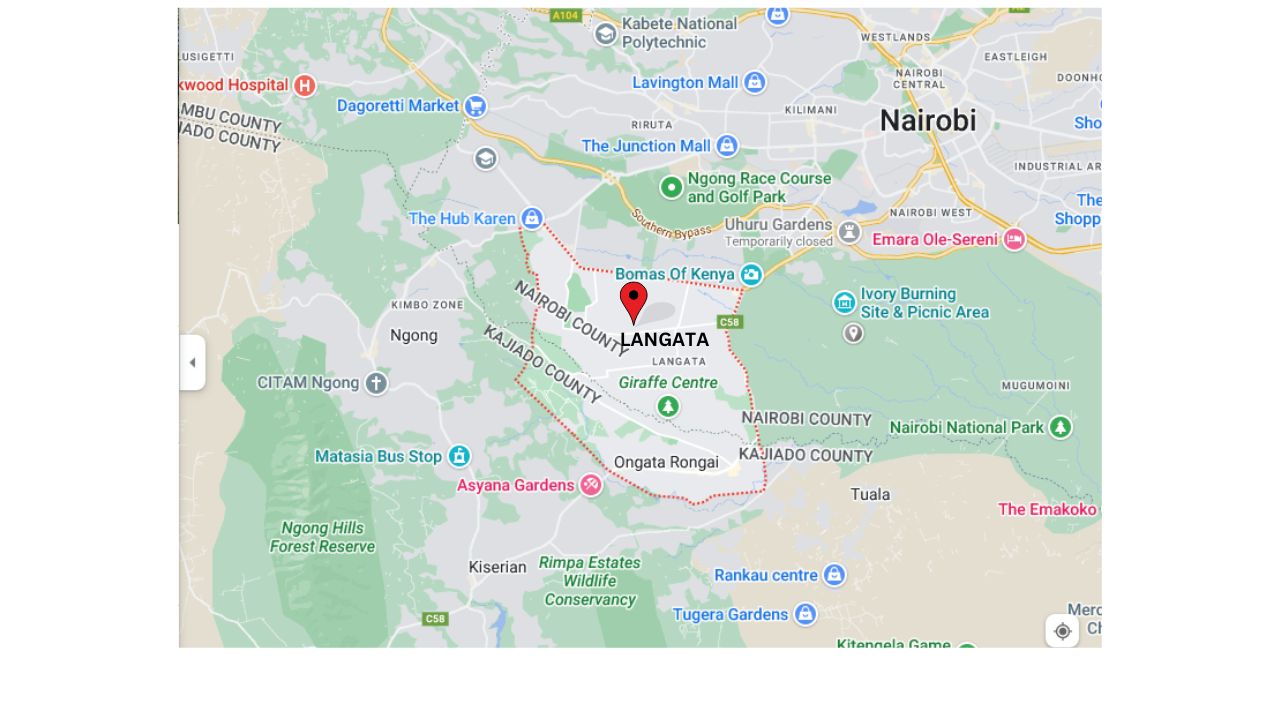
    Map of Langata neighborhood

    Properties For sale in Langata

    There are various properties for sale in Langata and depending on your budget, size requirements, and location you can find them on our website. Visit our website in the comfort of your home/ office and explore the property of your desire.

    Transport to Langata from Nairobi

    Traveling from Nairobi to Langata, one can board a matatu route number 14 or route number 34 from bus station and St Peters church bus stop respectively. The fare ranges from Ksh50 to around 100 depending on the time of the day.

    Places of worship in Langata

    St. Michael Catholic Church

    Deliverance Church International

    House of Grace Church

    St Peters Methodist Church

    St. John the Evangelist Church

    St Michael the Archangel Catholic Church

    Evangelical Alliance of Kenya

    AIC Langata

    Regina Caeli Catholic Church

    Karen Vineyard Church

    Healthcare services close to/in Langata.

    Langata Hospital

    Montazari hospital

    Avenue Healthcare Langata clinic

    Gataka Public Hospital

    Garlands Medical center

    Tazama eye care

    Healthlink pharmacy

    St. Marys Mission Hospital (STMMH)

    Amber medical clinics

    Tabernacle International Hospital

    The Karen hospital

    Greenpark Pharmacy

    Fatina Maternity Hospital

    TF Pharmacy

    Aga Khan university hospital-Magadi road

    Sinai Hospital

    Marriakani Cottage Hospital

    Fitness center/ gyms in Langata

    Fitness Revolution

    First power fitness

    Titoh fitness gym

    Karen Gym and personal training center

    Smart gyms

    Trojan Health and fitness center

    Beauty/SPA Parlour in Langata

    Nothing like it spa- hardy

    Opulence spa

    Lasting impression spa

    Entim Sidai Wellness Sanctuary

    Extreme styling studio

    Schools in Langata

    Universities/Colleges

    Catholic University of East Africa

    Amref international university

    Strathmore University

    Nairobi Japanese School

    Highschools

    Sunshine secondary school

    Langata highschool

    Aloysius Secondary school

    Primary schools

    Acacia academy

    Don Bosco Primary School

    St.Ronan School

    St.Francis integrated primary school

    Nairobi academy school

    karen c primary school

    Langata primary school

    Hillcrest primary school

    PCEA Primary school

    Soweto academy

    Castle Primary School

    Entertainment joints in Langata

    Carnivore restaurant

    Airport lounge at Wilson airport

    Bombay grills

    Blackbox lounge

    Brent Bar and Grill

    Bush in-style restaurant

    Rental houses in Langata

    Below is the range of different rental prices for apartments and townhouses in Langata.

    Two bedroom        Ksh35, 000 to Ksh75, 000

    Three bedroom     Ksh55, 000 to Ksh80, 000

    Four bedroom       Ksh80, 000 to Ksh110, 000

    Internet providers In Langata

    Safaricom Home fiber

    Zuku Fiber

    Wavelink Networks-0748111304

    Limitless Technologies Ltd- 0734 079709

    Unireach Technology Limited- 0704610762

    Geornique Easysurf Internet-0203745418

    Bintos Internet- 0776412618

    Chase Communications and Internet services

    Notable landmarks in Langata

    Nyayo National Stadium

    Wilson Airport

    Karen Blixen Museum

    Langata Army Barracks

    Bomas of Kenya

    Kenya Wildlife Headquarters

    T-mall

    Uhuru Gardens

    Giraffe Centre

    Carnivore Grounds

    Advantages of living in Langata

    Diverse housing options.

    Langata has various housing options to cater to different lifestyles and budgets for individuals, students, or families who wish to reside here.

    Access to amenities

    All essential amenities such as supermarkets, shopping centers, banks, hospitals, and other essential services are in close proximity to Langata providing easy access to everyday necessities.

    Proximity to Nairobi CBD

    For students or individuals who would love to live in a lovely neighborhood close to Nairobi CBD where they can commute daily, then Langata is the place to be.

    Disadvantages of living in Langata

    High cost of living

    Compared to other neighborhoods close to Nairobi CBD, the cost of living in Langata is relatively higher. The prices of rental houses, property, goods, and services in Langata can pose a financial challenge to some residents.

    Water supply issues

    Some parts of Langata may experience water shortages occasionally, which may disrupt the daily routines of residents.

    Noise pollution

    Due to the high population, traffic congestion, and busy roads in Langata, noise pollution may be an issue, especially for residents who live close to roads and busy streets.

    Conclusion.

    Langata provides a fulfilling urban lifestyle making it a desirable neighborhood to visit or live in. To find a property of your desire in Langata explore our website, we have a list of properties on sale from some of the most trusted sellers in Kenya.

    Supposing you are also interested in learning more about different neighborhoods in Kenya. We invite you to our YouTube Channel, which contains a collection of neighborhood video guides showcasing the direction, streets, beauty, amenities, and unique aspects of the different neighborhoods.

    https://youtube.com/watch?v=ka7-DlUTamQ
  • How to Register a Company on Ardhisasa

    How to Register a Company on Ardhisasa

    Ardhisasa is an online platform that allows Citizens, other stakeholders and interested parties to interact with land information held and processes undertaken by Government.Here is the process of registering a company on ardhisasa.

    1.      Visit ardhisasa platform on https://ardhisasa.lands.go.ke.

    2.      Click on the registration. You will be directed to a page that displays registration options. Choose company registration from the available choices.

    Also Read: How to Create an Individual Account on Ardhisasa.

    3.      On the registration detail page, you will find several fields that need to be filled in. Enter the name of your company. Provide the registration number of your company found on the certificate of incorporation. Then, select the country in which your company is based (e.g., Kenya). It’s important to note that these three fields are marked with an asterisk

    , indicating that they are mandatory.

    4.      Enter the KRA (Kenya Revenue Authority) PIN of your company. Remember, the company’s KRA PIN is separate from the owner’s or director’s PIN.

    5.      Fill in the physical address and postal address of your company. Once you have filled in all the required registration details, click on the verify button. This will initiate a verification process based on the records of the Business Registration Services.

    Important: How to Add Property on Ardhisasa

    6.      you will proceed to phone number verification. Select the country associated with your company’s phone number (e.g., Kenya).

    7.      Enter the company’s phone number and click on the get OTP (One-Time Password) button. You will receive a unique OTP on the provided phone number. Enter the OTP code to verify your phone number. Upon successful verification, you will receive a system notification confirming the verification.

    8.      Enter the email address and click on the get OTP button. A one-time password will be sent to the provided email. Check your email inbox and locate the email containing the OTP code. Enter the code in the OTP prompt box and click verify. If the verification is successful, you will receive a system notification confirming the email verification.

    9.      Choose a secure password for your account. The password must be at least eight characters long and include at least one uppercase letter, one lowercase letter, one number, and one special character.

    10.  Confirm your password and accept the terms and conditions by checking the corresponding checkbox. Then, click on the register button to complete the registration process

    11.  After successful registration, you will receive an ardhisasa ID on both the registered phone number and email address. You will then be directed to the login page.

    12.  Enter your identification number or ardhisasa ID, along with your password. Click on continue. An OTP will be sent to your phone, which you should enter in the provided OTP prompt box.

    13.  Click on login to access your account.

    Read: Registration Process of Foreign Nationals on Ardhisasa.

    Once you are logged into your account, navigate to the account tab on the left side of the screen Find the account settings. Fill in the security questions to enable identity verification in case of account compromise. Then, upload relevant identification documents for your company, such as the registration certificate.

    Choose the identification type and enter the relevant details, such as the registration number. Upload the corresponding document file from your local machine. Review your uploaded documents and click on submit documents if you are satisfied with the selection.

    For enquiries, please visit Ardhi House, Off Ngong Rd: P.O. Box 30450-00100, Nairobi,Kenya or email: [email protected]. The ministry can also be reached on phone: 0746 962239.

    In case of more information, keep visiting our website https://property254.co.ke/ or call us on 0726982982 or on email through [email protected].